
Apple HomeView is a new smart home display designed to bring entertainment, communication, and home controls into one convenient device. Introduced by Apple in October 2026, it combines a touchscreen, Siri AI, smart home management, and personalized features in a compact design.
The device is built for households that want to manage compatible smart home accessories, make FaceTime calls, listen to music, check reminders, and access useful information without constantly reaching for a phone. It also supports personalized experiences for multiple household members.
With its 7-inch Liquid Retina display, built-in speakers, and Apple Intelligence features, Apple HomeView represents Apple’s latest effort to make everyday home technology more connected and convenient.
What Is Apple HomeView?
Apple HomeView is a smart home display that combines features of a digital assistant, entertainment screen, communication device, and smart home control center. It is designed to work closely with Apple’s existing ecosystem, including compatible iPhones, iPads, HomePods, and Apple Home accessories.
Unlike a traditional tablet, HomeView is intended to stay in a shared space, such as a kitchen, living room, bedroom, or hallway. Household members can use it to check schedules, control lights, view compatible camera feeds, and access entertainment.
The device also introduces a more personalized version of Siri AI. It can recognize supported household members and display relevant personal information while keeping individual content separate.
Apple HomeView Release Date
Apple introduced HomeView on October 13, 2026. According to Apple’s announcement, the device is scheduled to become available on November 13, 2026, in supported markets.
Customers can check Apple’s official website and Apple Store app for preorder information, regional availability, and purchasing options.
The release schedule may vary by country. Apple has also indicated that HomeView will not initially be sold in the European Union because Siri AI is not currently available there in the required form.
How Much Does Apple HomeView Cost?
Apple HomeView starts at $299 in the United States, according to launch coverage and Apple’s product announcement.
The device is offered in standard and wall-mounted versions. Buyers should check the official store for the price of their preferred configuration and any additional mounting accessories.
| Product detail | Information |
| Product name | Apple HomeView |
| Starting price | $299 in the United States |
| Display | 7-inch Liquid Retina |
| Processor | Apple A18 |
| Smart assistant | Siri AI |
| Camera | 12MP Center Stage |
| Colours | Silver, Starlight, Rose Pink, Space Gray |
| Announced | October 13, 2026 |
| Scheduled availability | November 13, 2026 |
Prices, taxes, and availability can vary by region. Additional accessories may cost extra.
Apple HomeView Design and Display
Apple HomeView features a compact design with a display mounted above a rounded speaker base. The adjustable hinge lets users change the viewing angle to suit different rooms and activities.
The device includes a 7-inch Liquid Retina display with True Tone technology. Its brightness can adjust to different lighting conditions, making the screen suitable for daytime use as well as dimmer evening environments.
Apple offers four colour choices: Silver, Starlight, Rose Pink, and Space Gray. These options allow buyers to select a finish that fits their home decor.
A wall-mounted version is also available for locations such as entrances and hallways, where users may want quick access to smart home controls.
Apple HomeView Features
Apple HomeView combines several everyday functions into one device.
1. Siri AI Assistant
Siri AI is one of the main features of HomeView. Users can ask questions, request information, set timers, manage reminders, and get help with everyday tasks.
Apple says the updated assistant supports more natural conversations and can provide answers using broader world knowledge. When paired with a compatible Apple Intelligence-enabled iPhone or iPad, it can also use relevant personal context to provide more helpful responses.
Siri AI initially supports English, and usage limits may apply.
2. Smart Home Controls
HomeView works as a central dashboard for compatible Apple Home accessories. Users can adjust lights, manage supported locks, control thermostats, and operate compatible smart home scenes.
The Home app brings these controls together on the display, allowing household members to manage supported accessories using touch or voice commands.
Compatibility depends on the accessory and its support for Apple Home.
3. FaceTime Video Calls
The device includes a 12-megapixel Center Stage camera designed for FaceTime calls. Center Stage helps keep participants in the frame as they move around or as additional people join the conversation.
Its built-in microphones are designed to capture voices clearly, while the speaker system provides audio for hands-free conversations.
This feature may be useful for families who want to stay connected while cooking, working around the house, or spending time in shared rooms.
4. Music and Entertainment
Apple HomeView supports entertainment features such as music, podcasts, audiobooks, videos, and other compatible apps.
Its built-in speaker system supports Spatial Audio and is designed to produce clear sound with room-filling audio. Users can also continue supported activities from an iPhone on HomeView through Apple’s Handoff feature.
For households that already use Apple services, the device can provide a convenient shared screen for entertainment.
5. Personalized Household Profiles
HomeView can recognize up to six people and provide a personalized experience for each supported user.
Depending on the user’s setup, the device can display relevant information from Messages, Calendar, Reminders, FaceTime, and Find My.
Apple says personal information is kept separate between users. Access to personal content requires the appropriate account, a compatible paired device, and the required network and security conditions.
6. Digital Photo Frame
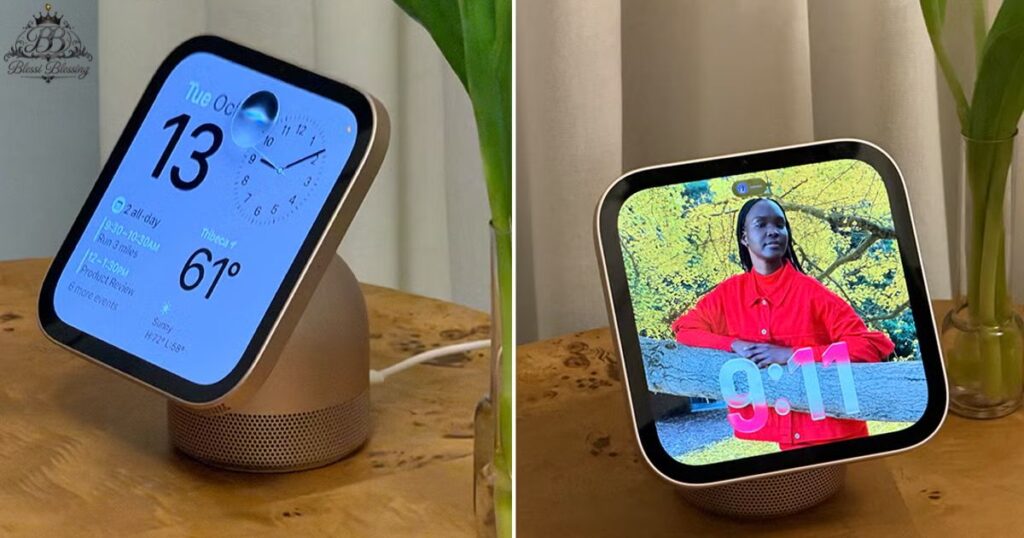
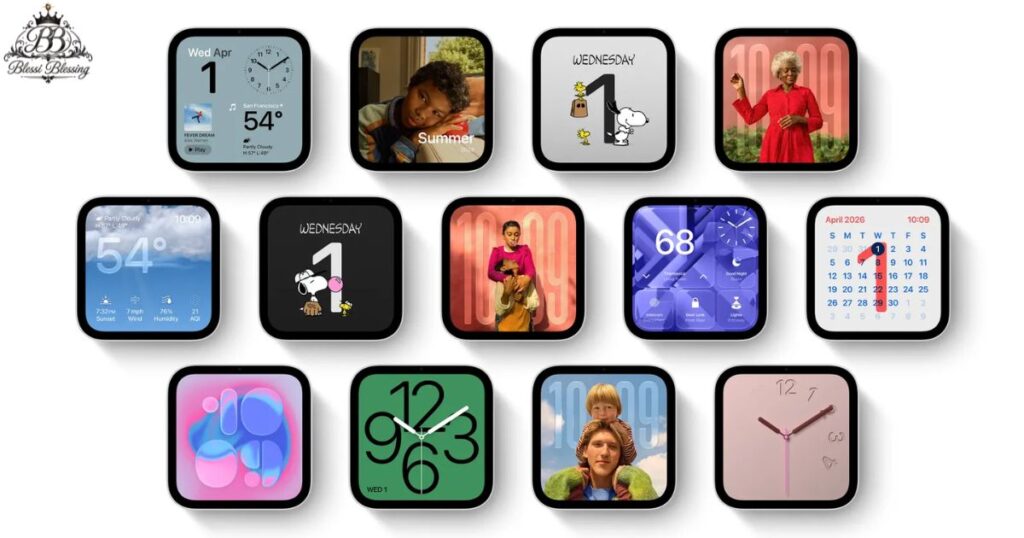
HomeView can display personal photos and shared albums. Users can choose visual layouts that complement their room and use the screen to showcase memories.
Customizable display faces can also show useful information, including the calendar, weather, and clock.
7. Smart Home Camera Viewing
The Home app allows users to view compatible smart home camera feeds through HomeView. Apple’s Home Camera display can show up to nine video feeds simultaneously, depending on the setup.
This can make it easier to check different areas of a property from one screen. Available features depend on the connected cameras and supported accessories.
8. Reminders, Timers, and Daily Tasks
HomeView can help organize everyday routines. Users can set multiple timers, check reminders, review calendar events, and access supported Live Activities.
For example, someone preparing dinner could use the screen to follow a recipe while keeping a timer visible. Another household member could check the calendar or control the lights without picking up a phone.
Apple HomeView Specifications
The main hardware and feature details announced by Apple include:
| Specification | Details |
| Display size | 7 inches |
| Display technology | Liquid Retina with True Tone |
| Chip | Apple A18 |
| Camera | 12MP Center Stage |
| Microphones | Four beamforming microphones |
| Audio | Built-in speakers with Spatial Audio support |
| User recognition | Up to six people |
| Smart home platform | Apple Home |
| Voice assistant | Siri AI |
| Connectivity ecosystem | Compatible Apple devices and smart home accessories |
| Standard colours | Silver, Starlight, Rose Pink, Space Gray |
| Mounting option | Standard stand and wall-mounted version |
Apple’s published specifications and regional product pages should be consulted for the final details applicable to a specific model.
How Does Apple HomeView Work?
Apple HomeView is designed to work with compatible Apple devices and accessories. Once configured, users can interact with the display through touch, voice commands, and supported personalized features.
The setup generally involves connecting the device to a home network, signing in with an Apple Account, and adding compatible smart home accessories through the Home app.
For personalized information, users need compatible Apple devices and the required household setup. Guests and unrecognized users can still access certain general functions, such as timers, weather, music, and smart home controls, without gaining access to another person’s private information.
The exact setup requirements depend on the features a household wants to use.
Apple HomeView Privacy and Security
Privacy is an important part of Apple’s approach to HomeView. Since several people may share the same screen, the device is designed to separate their personal content.
Apple says the A18 chip includes Secure Exclaves that handle camera and microphone data used for recognition in a protected environment. The system is designed to recognize supported users without exposing the underlying audio and visual recognition data to the operating system.
Apple Intelligence also uses privacy protections, including on-device processing and Private Cloud Compute for supported requests.
Users should still review their account settings, connected accessories, and privacy permissions before enabling personal information or camera access on a shared device.
Apple HomeView Wall-Mounted Version
Apple also offers a wall-mounted HomeView model. This option is designed for spaces where a screen mounted on a wall is more practical than a display sitting on furniture.
Potential locations include:
- Kitchen walls for timers and recipes.
- Hallways for quick home controls.
- Entryways for compatible camera feeds.
- Shared family spaces for schedules and reminders.
The wall-mounted version is available in selected colours. Buyers should check which mounting options and power accessories are supported in their region before purchasing.
Apple HomeView vs. a Smart Speaker
A traditional smart speaker focuses mainly on audio, voice commands, and assistant functions. Apple HomeView adds a visual interface, camera, video calls, and a touchscreen for controlling compatible accessories.
| Feature | Apple HomeView | Traditional smart speaker |
| Touchscreen | Yes | Depends on the model |
| Voice assistant | Siri AI | Depends on the platform |
| Video calls | FaceTime support | Depends on the model |
| Smart home controls | Yes, through Apple Home | Depends on the platform |
| Personal profiles | Supports up to six recognized users | Varies by device |
| Digital photo display | Yes | Usually limited or unavailable |
| Apple ecosystem integration | Designed for Apple devices | Varies by manufacturer |
The right choice depends on the devices a household already owns and the features it needs.
Apple HomeView vs. iPad
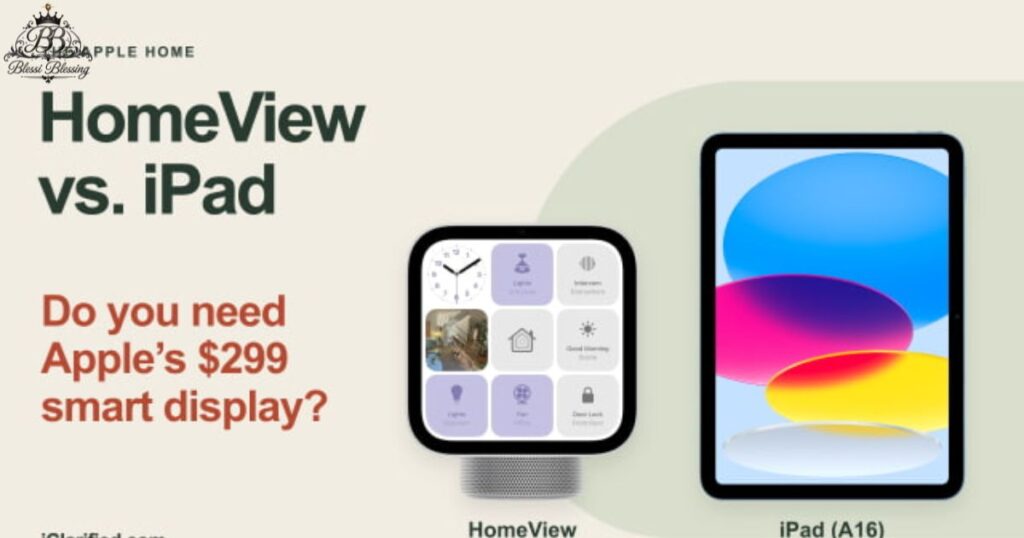
Although both products have a screen and support Apple services, they serve different purposes.
An iPad is a portable tablet designed for work, browsing, games, reading, and many other activities. HomeView is designed primarily as a shared home display that remains in one location.
HomeView provides built-in speakers, a dedicated smart home interface, user recognition, and a camera designed for Center Stage video calls. An iPad offers greater portability and a broader tablet experience.
People who want a dedicated control center may prefer HomeView, while those who need a device for travel and general computing may find an iPad more suitable.
Is Apple HomeView Worth Buying?
Apple HomeView may appeal to people who already use iPhones, Apple Home accessories, and other Apple services. It brings several household tasks together and provides a dedicated screen for entertainment, calls, schedules, and smart home controls.
However, the value depends on how often those features will be used. Someone who only needs a basic voice assistant may not need a dedicated display, while a household with multiple compatible accessories may find it more useful.
Before buying, consider the price, regional availability, accessory compatibility, language support, and whether everyone in the household uses compatible Apple devices.
Who Should Consider Apple HomeView?
Apple HomeView may be useful for:
- Apple households: People who already use compatible iPhones, iPads, and Apple Home products.
- Families: Households that want a shared screen for calendars, calls, reminders, and entertainment.
- Smart home users: People who want a central place to manage compatible lights, locks, cameras, and thermostats.
- Music lovers: Users who want a dedicated screen and built-in audio for music and podcasts.
- People who make frequent video calls: Households that use FaceTime and want hands-free communication.
It may be less appealing to people who prefer a portable device or rely mainly on smart home accessories outside Apple’s ecosystem.
Relevant Post……..Ilhan Omar: Biography, Age, Career, Family, Policies, and Latest News
Apple HomeView Availability by Country
Apple HomeView is scheduled to launch in selected markets beginning November 13, 2026. Availability and pricing differ by country.
Apple has listed availability information for markets including the United States, United Kingdom, India, Canada, Australia, New Zealand, Singapore, and South Africa. Siri AI availability is initially limited to English in supported markets.
The product is not initially available for sale in the European Union, according to Apple’s announcement. Buyers in other countries should check their local Apple Store for confirmation rather than assuming that the US release schedule applies worldwide.
Frequently Asked Questions
What is Apple HomeView?
Apple HomeView is a smart home display that combines Siri AI, entertainment, FaceTime, personalized information, and controls for compatible Apple Home accessories.
How much does Apple HomeView cost?
The announced US starting price is $299. Regional prices, taxes, accessories, and availability may differ.
When will Apple HomeView be released?
Apple announced HomeView on October 13, 2026, with availability scheduled to begin on November 13, 2026, in supported markets.
What size is the Apple HomeView display?
It has a 7-inch Liquid Retina display with True Tone technology.
Does Apple HomeView have a camera?
Yes. It includes a 12-megapixel Center Stage camera designed for FaceTime video calls.
Does Apple HomeView work with Siri?
Yes. Siri AI is built into HomeView and supports voice-based assistance, everyday tasks, and smart home controls.
Can multiple people use Apple HomeView?
Yes. HomeView can recognize up to six people and personalize supported features for each user.
Can Apple HomeView control smart lights?
Yes. It can control compatible smart lights and other supported accessories through the Apple Home app.
Does Apple HomeView support FaceTime?
Yes. It supports FaceTime video calls and includes Center Stage technology to help keep people in the frame.
Is Apple HomeView available in every country?
No. Availability is limited to selected markets, and the launch schedule and Siri AI language support vary by region.
Does Apple HomeView require an iPhone?
A compatible iPhone or iPad and Apple Account are required for the full personalized experience. Some general functions remain available to guests and unrecognized users.
Is Apple HomeView the same as an iPad?
No. An iPad is a portable tablet, while HomeView is designed as a shared smart home display for a fixed location.
Conclusion
Apple HomeView brings smart home management, entertainment, communication, and personalized assistance into one device. Its 7-inch Liquid Retina display, Siri AI, Center Stage camera, built-in audio, and support for multiple household members make it a notable addition to Apple’s home technology lineup.
The device is scheduled to become available on November 13, 2026, with a starting price of $299 in the United States. Whether it is worth buying depends on a household’s existing Apple devices, smart home setup, and need for a shared display.
Before purchasing, check the latest regional availability, accessory compatibility, and official specifications to make sure Apple HomeView fits your needs.

